After giving it some thought I’ve decided to take brief hiatus from this blog, but will be back in late August. I am planning to reboot the Six Week Creator Challenge at that time, for a number of reasons. First of all, I’ve come to the hard realization that, as usual, I have WAY TOO MUCH on my plate. Or, to mix metaphors, too many plates in the air. I’m trying to work on this challenge, create products for TpT to get ready for the Back-to-School season on TpT, revise a novel, start a new novel, finish up some work on Fiverr, which I plan to eventually cancel (more on that in August), and get my kids ready to go back to school.
I forgot how crazy this time can be, with back-to-school shopping, doctors apppointments, and trying to squeeze out a few more summer memories with my kids. It was completely foolish of me to try to a new challenge at this time.
I also want to rethink the challenge, and one reader gave me the idea that I should create it as a free course, along with some worksheets or a workbook, to give readers a concrete way to follow along and to have a resource as a takeway.
So, in conclusion, I’ve decided to spend the remainder of July hanging out with my kids and getting organized for the fall, and spend August focusing my efforts on creating content BEFORE I start posting again. One of the biggest struggles I have as a creator is FOCUS, and I’m also trying out new ideas and spreading myself too thin.
Be sure to subscribe so you’ll get an email when I return, because I’m going to have some amazing free offers at that time. Meanwhile, enjoy the rest of the summer season!
As part of the the Six-Week Creator Challenge, I promised to share free tools that I use to create and sell digital products online. This week focuses on TpT (Teachers Pay Teachers), but even teachers who don’t plan to sell on TpT will find these tools useful.
If you’re a teacher or educator looking to turn your classroom resources into digital products, you don’t need expensive design software to get started. In fact, some of the most popular products on Teachers Pay Teachers (TpT) are created with tools you already know and love, such Google Docs and Google Slides. For those of you who don’t like Google products, I will be addressing other free tools, such as Canva and MS Office tools, in future posts.
However, I love Google’s free suite of tools, especially Docs and Slides. Whether you’re building engaging graphic organizers, editable writing prompts, or classroom decor, Google tools can help you create polished, professional-looking products with ease. Here’s how to get started.
Step 1: Choose the Right Tool for Your Product
Google Docs is perfect for:
Printable worksheets
Reading passages
Lesson plans or unit outlines
Instructional guides or templates
Google Slides is great for:
Interactive lessons
Task cards or flashcards
Anchor charts
Student activities that require visual organization
Editable classroom signs or posters
The best part is that you can also combine both tools—use Docs for written instruction and Slides for visuals.
Step 2: Set Up Your Document or Slides for TpT Use
Page Setup:
For printable products, change the slide/page size to standard 8.5 x 11 inches (File > Page Setup > Custom).
Use landscape or portrait depending on your design needs.
Branding & Design:
Use consistent fonts, colors, and a simple logo or footer with your name/store link.
Add a cover page, directions page, and credit page to your product.
Include terms of use and citation for any graphics or fonts used.
Make it Editable (Optional):
Create editable text boxes in Slides so teachers can customize parts of the product.
In Docs, use tables or comments to guide users where they can modify content.
Step 3: Export, Bundle, and Upload
When your product is complete:
Export as a PDF for secure, print-ready versions.
If offering an editable version, include the Google Docs or Slides link using a force-copy URL.
Bundle PDFs and editable versions in a ZIP file if needed.
Upload your product to TpT:
Write a clear, keyword-rich product title and description.
Include preview images (screenshots of your Doc/Slides).
Tag relevant grade levels and standards.
Final Tips for Success
Start with resources you already use in class. If it worked for your students, chances are other teachers will find it valuable too.
Keep your formatting simple and classroom-tested.
Reuse templates! Save time by reusing Docs/Slides layouts across multiple products.
Creating high-quality TpT products doesn’t require fancy design software. With Google Docs and Slides, you can create resources that are clean, customizable, and totally teacher-friendly.
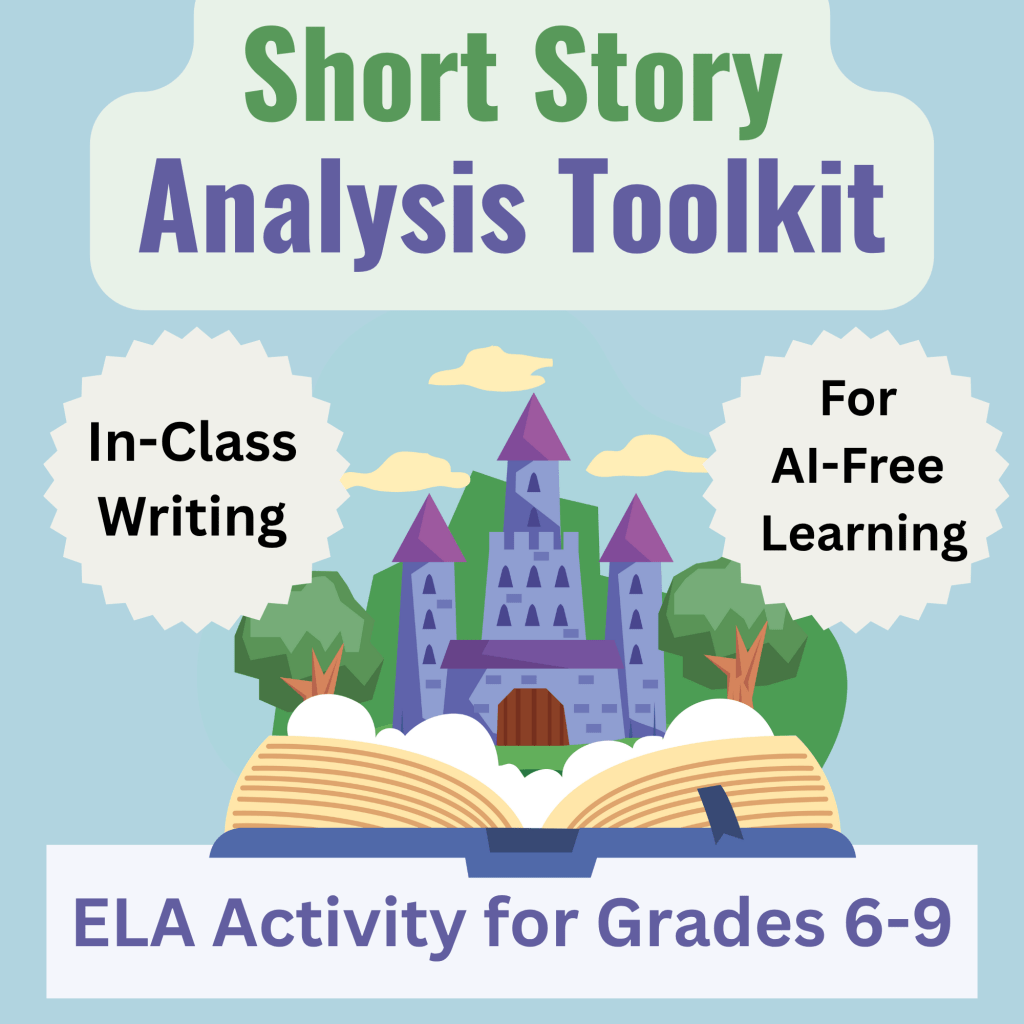
Short Story Analysis Tool-Kit
I created the product below, in my TpT store, using Google Docs + Canva (for the cover)
This week is all about teachers! For Week One of the Six-Week Creator Challenge I will focus on Teachers Pay Teachers (which is now called TpT), which is a platform for creating and sharing lesson plans and teaching materials.
When creating the Six-Week Creator Challenge I decided to focus on ONE platform per week, to help me stay focused, and to force me to start creating content for that platform. I will then continue to create content for that platform consistently (at least once per week) once I move on to explore the other platforms. As I mentioned in Sunday’s post, I will then share my progress and metrics each week, as well as discuss the pros and cons of each platform. At the end of the six weeks I’ll do a big write up about my overall impressions and progress.
I’m not going to write about how to get started on Teachers Pay Teachers, you can read about that in this post. Instead, I’m going to share details about my overall process, as well as steps I will take to improve growth and engagement on that platform (and hopefully revenue!).
I’ve been on TpT for several years now, but have never put much time into it, nor approached it with a coherent strategy. One of the reasons I created this challenge to was to learn about each platform and make an intentional effort to improve by creating content consistently and getting to know the ins and outs of the platform’s (and my niche’s) audiences and algorithms.
Why Knowing Your Audience is So Important
Knowing your audience is essential when creating content for online platforms because it allows you to tailor your message, tone, and delivery to meet the specific needs, interests, and expectations of the people you’re trying to reach. Understanding who your audience is helps you choose the right format, language, and content strategy to engage them effectively. It also increases the likelihood that your content will resonate, be shared, and achieve its intended purpose, whether that’s to inform, entertain, inspire, or drive action. Without a clear understanding of your audience, even the most well-crafted content can fall flat.
Find a Problem to Solve
One key factor in thinking about your audience is to help them solve a problem by offering a product, tutorial, or solution that meets their needs. And to go above and beyond! (“Take my money!”). For TpT, this involves thinking about teachers in my niche, which is creating ELA (English Language Arts) content (hence the title of this blog: ELA Source).
Luckily for me, ELA teachers have a lot of problems to solve, ha ha. From worrying about plagiarism and AI, to struggling with student behavior and enagement (what to do about phones?), to finding resources on the best ways to teach reading, writing, and grammar.
Find Your Niche: Play to Your Strengths
By focusing on this audience and this niche, I’m playing to my strengths. I have a BA in English, an MA in Literature, and a Doctorate in Curriculum Design. I’ve also been a teacher at the middle school, high school, and college levels for 30 years.
Goals for this Week
This week I’m going to focus on creating products that help teachers avoid plagiarism and AI by engaging them in the research and writing process in the classroom, which I feel very strongly is the solution to avoiding AI (more on this in another blog post).
Tomorrow I will post about how I use free online tools to create and sell digital content and I’ll give you a peek at the resource I’m creating for TpT. Be sure to subscribe if you’d like to follow along for this challenge. It’s free to subscribe and I don’t share your emails with anyone. 🙂
Welcome to Side-Hustle Sunday! Each week in this weekly round-up I will discuss:
Current updates and metrics across all platforms
A review of the platform I focused on for the previous week (I will skip this the first week and instead provide a brief overview of all of the platforms I post on).
What I accomplished
Lessons learned
Next week’s platform + goals
Platforms:
For several years now, I’ve been exploring and building on a variety of platforms in an attempt to build and audience and establish a consisten income stream.
Each of these platforms have different strengths, audiences, and content types. Here’s a quick tour of where I’m posting and why:
Teachers Pay Teachers (TpT)
What it is: An online marketplace where educators sell lesson plans, activities, assessments, and classroom resources. Why I use it: I can turn my existing teaching materials into income by sharing them with other educators. Best for: Teachers, tutors, and curriculum creators in K–12 or higher ed.
Etsy
What it is: A creative marketplace for handmade goods, vintage finds, and—more recently—digital downloads like planners, journals, and printables. Why I use it: It’s great for selling beautiful, useful products with a strong visual or aesthetic appeal. Best for: Printables, digital planners, classroom decor, wall art, and niche kits.
Instagram
What it is: A visual-first social media platform used for branding, marketing, and community building. Why I use it: It’s a great place to showcase behind-the-scenes content, quick tips, and build connections with other creators. Best for: Growing your audience, cross-promoting products, and showing personality.
WordPress (My Blog)
What it is: A blogging and website platform that lets you publish long-form content, tutorials, and updates. Why I use it: It’s my content home base—great for SEO, in-depth posts, and linking to my products. Best for: Evergreen content, long-form tutorials, and resource roundups.
Pinterest
What it is: A visual discovery engine where users save and share ideas—especially for education, crafts, home, and DIY. Why I use it: My blog and products can gain long-term traffic through visually appealing pins. Best for: Teachers, creatives, and anyone with visually-driven content or tutorials.
Royal Road + KDP (Self-Publishing)
Royal Road: A free web serial platform where you can publish your fiction one chapter at a time. KDP (Kindle Direct Publishing): Amazon’s self-publishing service for eBooks and print books. Why I use them: Royal Road is great for building a reader base, while KDP allows me to sell completed books or journals. Best for: Writers of fiction, fanfic, low-content books, and serial storytellers.
YouTube
What it is: A video-sharing platform used for tutorials, vlogs, reviews, and educational content. Why I use it: YouTube lets me reach visual learners and build trust through face-to-face (or voice-to-voice) content. Best for: Teaching, documenting your journey, and creating content with long-term value.
Course Platforms (Udemy, Gumroad, etc.)
Udemy: A structured, student-facing course platform where you upload video lessons and reach learners through Udemy’s marketplace. Gumroad: A flexible storefront where you can sell mini-courses, ebooks, templates, and more—directly to your audience. Why I use them: These platforms help me turn knowledge into income by packaging what I know into teachable, sellable formats. Best for: Creators with teachable skills or digital products.
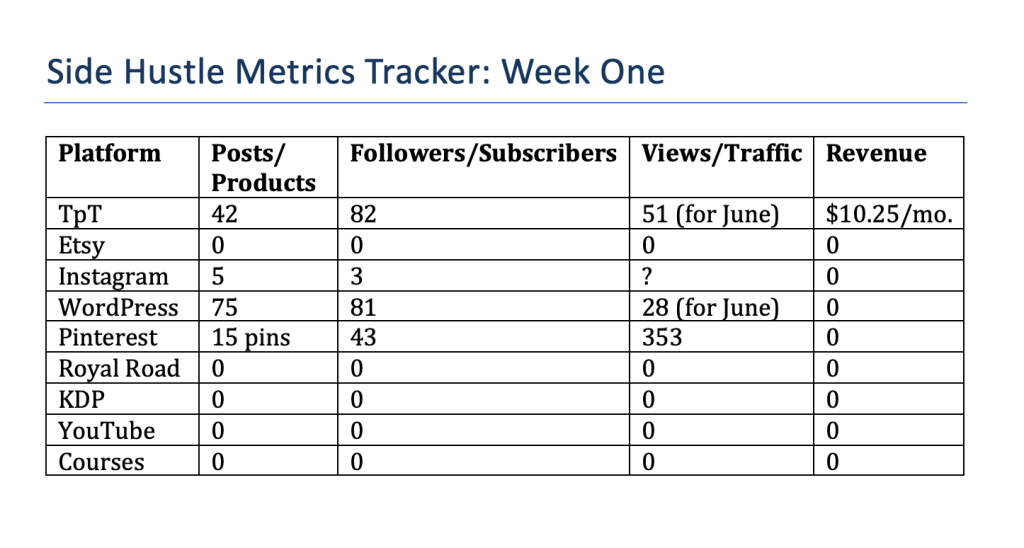
MyCurrent Metrics:
Below is a table with all of the platforms I intend to publish on (I won’t be focusing on all of these during the six week challenge, but will update this table every week). As you can see, for some platforms, like Etsy and YouTube, I haven’t started posting products and videos yet, nor have I created any courses, but I’m including them in these metrics because I want you to have a real-time record of my progoress.
Week One: TpT (Teachers Pay Teachers)
This week, I’ll be focusing on Teachers Pay Teachers (TpT), which is a platform designed for educators to buy, sell, and share classroom resources. If you’re a teacher, tutor, or curriculum creator, TpT is a fantastic way to turn your hard work into passive income by listing the lessons, activities, and worksheets you already use in your classroom. It’s beginner-friendly, especially if you start with free tools like Google Slides or Canva to design your products.
My goal for the week is to create one product from scratch and take steps to improve my overall metrics, while at the same time walking you through the process of how I create products using free tools and how I improve my metrics and build my audience.
I’m starting two new features on my blog. One is Side Hustle Sunday in which I discuss my attempts at content creation and post updates and metrics for each of the platforms I use. I will start tomorrow by providing metrics for each of the following platforms:
TpT (Teachers Pay Teachers)
Etsy
Instagram
Royal Road (web serials) and KDP (Amazon Self-Publishing)
YouTube
Courses (primarily Gumraod and Udemy)
These are all of the platforms I plan to explore as a content creator, my niche being teaching materials and ELA curriculum, plus resources for writers along with my own fiction. I haven’t “niched down” very far yet (ELA and writing content and resources is still pretty broad), but I may do that once I find my footing on these sites and get a sense for how much time and effort it takes to create content for these sites, as well as how much success I have with different types of content. But for the next six weeks I will NOT stray from the content focus areas of ELA Curriculum and Writing, except for this blog, which will feature posts that will be a meta exploration of HOW I create my content and how well my digital products sell online.
Each week will include:
A featured platform
Free tools to get started
A personal goal/task
Daily posts: tips, tutorials, check-ins
Sunday roundup: updates + metrics
The “Sunday Side-Hustle” Roundup Posts will include:
A review of the platform I focused on for the previous week
What I accomplished
Metrics: views, followers, sales, posts
Lessons learned
Next week’s platform + prep goals
I’m excited to get started on this journey and share with you what I’ve learned! Be sure to subsribe below so you don’t miss a post! It’s free to subscribe and I don’t share your emails with anyone 🙂





 ELA Source
You must be logged in to post a comment.